| Voir le sujet précédent :: Voir le sujet suivant |
| Auteur |
Message |
hacksawbob 

Inscrit le: 28 Fév 2007
Messages: 1293
Localisation: LANCS UK
|
 Posté: Lun Oct 06, 2008 6:57 pm Sujet du message: Digital workflow from a pro |
|
Posté: Lun Oct 06, 2008 6:57 pm Sujet du message: Digital workflow from a pro |
|
|
hacksawbob wrote:
I went on a two day course with Lovegrove consulting and thought I would share with you the basic workflow for a high volume operation involved mainly in wedding photography. This is not maybe suitable for us low volume shooters (ie less than 500 shots in a day) but it may give you an insight into how one of the pro outfits do it.
Shoot the wedding in SRGB! (better for skin tones apparantly, they were all 5d shooters by the way seems to be th ee de facto wedding camera)
Transfer RAW files from card/s to External hard disk conected via Firewire 800
Import all the files into a catalog in LR but leave the actual raw files on the external drive.
select your best shots by flagging them in LR
rename the files you want to keep with the clients name and a number by selecting all the flagged pictures.
copy the renamed files from the external drive to a local hard disk, either leaving the unwanted ones on the external drive or copying them to an "unwanted folder on the local disk if space permits.
Edit the raw files in lightroom for global colour/vignette/mono conversions etc
Export the LR edited files in uncompressed TIFF 16 bit if significant manipulation required in PS or 8 bit if minimal adjustments interestingly they chose this stage to go from SRGB to Adobe RGB, which puzzled me somewhat but they said that that is what they have found to suit their style/skintones etc.
do healing cloning cosmetic retouching etc in PS
they saved the images for the printers as highest quality JPGs applying any sharpening at this stage. they also had some adjustments based on test patterns that they had sent to each commercial printer they used ie they found one printing firm darkened them %16 so they boosted the dark point in curves to compensate for it.
_________________
LENS LIST |
|
| Haut de page |
|
 |
piticu

Inscrit le: 04 Août 2008
Messages: 591
Localisation: Romania
|
Posté: Lun Oct 06, 2008 7:57 pm Sujet du message: |
|
Posté: Lun Oct 06, 2008 7:57 pm Sujet du message: |
|
|
piticu wrote:
Interesting to know that. I think that everybody has a more or less the same workflow suited to his/hers taste. IE, for me it makes sense to do the downloading/renaming/applying metadata/backing up somewhere else, all of that in the same step, completely automatic. But again, you have to go for what fits your purpose/style/taste better 
_________________
www.atelierelealbe.eu |
|
| Haut de page |
|
|
Ballu
Inscrit le: 28 Fév 2007
Messages: 912
Localisation: Columbus, OH. USofA
|
Posté: Mar Oct 07, 2008 1:08 am Sujet du message: |
|
Posté: Mar Oct 07, 2008 1:08 am Sujet du message: |
|
|
Ballu wrote:
| piticu a écrit: |
| Interesting to know that. I think that everybody has a more or less the same workflow suited to his/hers taste.... |
Its interesting... I personally never took any class and/or read any book...
My work flow is (didnt know earlier, we have term for this),
Download all the file to external drive drive connected to home PC (With 350D, I used to take card out.. with XSi, I use USB cable and Canon software).
create a catalog in LR (if using LR, I am using trial copy yet, no plan to buy) or open the directory. Or I open the directory as catalog in Canon software.
Use WB/Contrast/Tone curve (usually auto setting, and move the saturation back to 100, initial value, and sharpening to 0 value).
Convert to TIFF with 16-bit settings.
Open the TIFF file in "Picture Window Pro" ver4.0 software (my paid picture editor not for graphics purposes).
Do all the editing needed: (if needed)
-> Dynamic range stretch, play with mostly pushing mid tones, Brightness curve (S-treatment), color correction if any (doesnt need with RAW processing based work flow, and will try) and sharpening with un-sharp mask technique (very little with lenses I own).
If needed, play with saturation (which I have rarely used).
Save in full JPEG option.
(and upload pic to Flickr & show here... I dont have any client to show/sell  )
I think, its RAW processing which makes all the difference. I have noticed, for skin tones, flash captures and indoor shots/snapshots, JPEG results, directly from 450D camera are good.
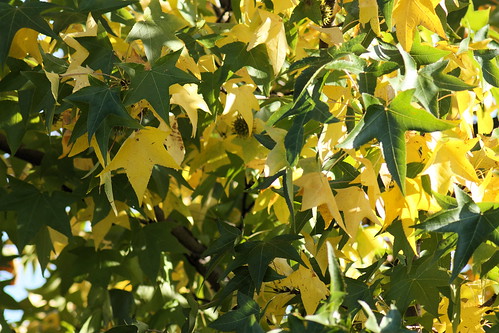
See the difference here,
(Captured with Pentacon 200mm f4, preset lens with interchangable mount.. used M42 mount)
Direct JPEG, with default setting, post processing:

result with RAW captured file and processed with Canon software and Picture window pro.
_________________
-Ballu
http://balyanpage.blogspot.com/ |
|
| Haut de page |
|
|
patrickh


Inscrit le: 23 Août 2007
Messages: 8551
Localisation: Oregon
Expire: 2011-11-18
|
Posté: Mar Oct 07, 2008 4:41 am Sujet du message: |
|
Posté: Mar Oct 07, 2008 4:41 am Sujet du message: |
|
|
patrickh wrote:
Ballu
To my eye the RAW to jpg wins hands down - more detail, better contrast and more realistic colors.
patrickh
_________________
DSLR: Nikon D300 Nikon D200 Nex 5N
MF Zooms: Kiron 28-85/3.5, 28-105/3.2, 75-150/3.5, Nikkor 50-135/3.5 AIS // MF Primes: Nikkor 20/4 AI, 24/2 AI, 28/2 AI, 28/2.8 AIS, 28/3.5 AI, 35/1.4 AIS, 35/2 AIS, 35/2.8 PC, 45/2.8 P, 50/1.4 AIS, 50/1.8 AIS, 50/2 AI, 55/2.8 AIS micro, 55/3.5 AI micro, 85/2 AI, 100/2,8 E, 105/1,8 AIS, 105/2,5 AIS, 135/2 AIS, 135/2.8 AIS, 200/4 AI, 200/4 AIS micro, 300/4.5 AI, 300/4.5 AI ED, Arsat 50/1.4, Kiron 28/2, Vivitar 28/2.5, Panagor 135/2.8, Tamron 28/2.5, Tamron 90/2.5 macro, Vivitar 90/2.5 macro (Tokina) Voigtlander 90/3.5 Vivitar 105/2.5 macro (Kiron) Kaleinar 100/2.8 AI Tamron 135/2.5, Vivitar 135/2.8CF, 200/3.5, Tokina 400/5,6
M42: Vivitar 28/2.5, Tamron 28/2.5, Formula5 28/2.8, Mamiya 28/2.8, Pentacon 29/2.8, Flektogon 35/2.4, Flektogon 35/2.8, Takumar 35/3.5, Curtagon 35/4, Takumar 50/1.4, Volna-6 50/2.8 macro, Mamiya 50/1.4, CZJ Pancolar 50/1,8, Oreston 50/1.8, Takumar 50/2, Industar 50/3.5, Sears 55/1.4, Helios 58/2, Jupiter 85/2, Helios 85/1.5, Takumar 105/2.8, Steinheil macro 105/4.5, Tamron 135/2.5, Jupiter 135/4, CZ 135/4, Steinheil Culminar 135/4,5, Jupiter 135/3.5, Takumar 135/3.5, Tair 135/2.8, Pentacon 135/2.8, CZ 135/2.8, Taika 135/3.5, Takumar 150/4, Jupiter 200/4, Takumar 200/4
Exakta: Topcon 100/2.8(M42), 35/2.8, 58/1.8, 135/2.8, 135/2.8 (M42), Kyoei Acall 135/3.5
C/Y: Yashica 28/2.8, 50/1.7, 135/2.8, Zeiss Planar 50/1.4, Distagon 25/2.8
Hexanon: 28/3.5, 35/2.8, 40/1.8, 50/1.7, 52/1.8, 135/3.2, 135/3.5, 35-70/3.5, 200/3.5
P6 : Mir 38 65/3.5, Biometar 80/2.8, Kaleinar 150/2.8, Sonnar 180/2.8
Minolta SR: 28/2.8, 28/3.5, 35/2.8, 45/2, 50/2, 58/1.4, 50/1.7, 135/2.8, 200/3.5
RF: Industar 53/2.8, Jupiter 8 50/2
Enlarg: Rodagon 50/5,6, 80/5,6, 105/5.6, Vario 44-52/4, 150/5.6 180/5.6 El Nikkor 50/2,8,63/2.8,75/4, 80/5,6, 105/5.6, 135/5.6 Schneider 60/5.6, 80/5.6, 80/4S,100/5.6S,105/5.6,135/5.6, 135/5.6S, 150/5.6S, Leica 95/4 |
|
| Haut de page |
|
|
Orio

Inscrit le: 24 Fév 2007
Messages: 29545
Localisation: West Emilia
Expire: 2012-12-04
|
Posté: Mar Oct 07, 2008 5:01 am Sujet du message: |
|
Posté: Mar Oct 07, 2008 5:01 am Sujet du message: |
|
|
Orio wrote:
It is possible to obtain different colours from incamera jpg by choosing a different profile or making your own.
Having that said, of course RAW is the way to go.
_________________
Orio, Administrator
T*
NE CEDE MALIS AUDENTIOR ITO
Ferrania film is reborn! http://www.filmferrania.it/
Support the Ornano film chemicals company and help them survive!
http://forum.mflenses.com/ornano-chemical-products-t55525.html |
|
| Haut de page |
|
|
Rob Leslie
Inscrit le: 20 Mar 2007
Messages: 1103
Localisation: UK Swindon
|
Posté: Mar Oct 07, 2008 10:35 am Sujet du message: |
|
Posté: Mar Oct 07, 2008 10:35 am Sujet du message: |
|
|
Rob Leslie wrote:
I really think this part is useful !!!
'Shoot the wedding in SRGB! '
'Transfer RAW files from card/s'
‘Go from SRGB to Adobe RGB, which puzzled me somewhat’
Yes puzzled me as well.
How can you go from a lower info colour space to a higher one and see any advantage, or difference? The other way round yes.
Sounds like a great course!
_________________
Pentax K10D & K100D. Many Tamron Adaptall SP lenses, Fujinon f4.5 400mm. A loved Lens Baby 2, Lubitel triplet +++ and many film cameras. Mainly a Digital user inc G5, GR2
http://robstreet.blogspot.com/
http://robleslie.blogspot.com/
http://roblesliephotography.blogspot.com/
http://www.flickr.com/photos/64956578@N00/ |
|
| Haut de page |
|
|
piticu
Inscrit le: 04 Août 2008
Messages: 591
Localisation: Romania
|
Posté: Mar Oct 07, 2008 1:09 pm Sujet du message: |
|
Posté: Mar Oct 07, 2008 1:09 pm Sujet du message: |
|
|
piticu wrote:
Till now, the best source i've found on this subject is Bettina & Uwe Steinmueller's Digital Photography Workflow Handbook, even outdated a little bit it worths every penny. Also a good read is The DAM Book.
_________________
www.atelierelealbe.eu |
|
| Haut de page |
|
|
LucisPictor
Inscrit le: 26 Fév 2007
Messages: 17633
Localisation: Oberhessen, Germany / Maidstone ('95-'96)
Expire: 2013-12-03
|
Posté: Mar Oct 07, 2008 2:42 pm Sujet du message: |
|
Posté: Mar Oct 07, 2008 2:42 pm Sujet du message: |
|
|
LucisPictor wrote:
After a while everybody find his own workflow.
I shoot in RAW + medium JPG. The JPGs for quick access on any computer and the RAW for serious PP.
Then I mostly use ACR, sometimes DPP for RAW processing ans Photoshop to post process.
_________________
Personal forum activity on pause every now and again (due to job obligations)!
Carsten, former Moderator 
Things ON SALE
Carsten = "KAPCTEH" = "Karusutenu" | T-shirt?.........................My photos from Emilia: http://www.schouler.net/emilia/emilia2011.html
My gear: http://retrocameracs.wordpress.com/ausrustung/
Old list: http://forum.mflenses.com/viewtopic.php?t=65 (Not up-to-date, sorry!) | http://www.lucispictor.de | http://www.alensaweek.wordpress.com |
http://www.retrocamera.de |
|
| Haut de page |
|
|
Ballu
Inscrit le: 28 Fév 2007
Messages: 912
Localisation: Columbus, OH. USofA
|
Posté: Mar Oct 07, 2008 2:42 pm Sujet du message: |
|
Posté: Mar Oct 07, 2008 2:42 pm Sujet du message: |
|
|
Ballu wrote:
| Rob Leslie a écrit: |
'Shoot the wedding in SRGB! '
|
Rob, I always like your color treatment. Sometimes, over saturated, but again, its a experimentation and creativity which makes photography unique.
Whats your take, which profile we should use. If you monitor is profiled by yourself, how to choose the profile. I care less about web, I am planning to move to print now.
_________________
-Ballu
http://balyanpage.blogspot.com/ |
|
| Haut de page |
|
|
Rob Leslie
Inscrit le: 20 Mar 2007
Messages: 1103
Localisation: UK Swindon
|
Posté: Mar Oct 07, 2008 3:02 pm Sujet du message: |
|
Posté: Mar Oct 07, 2008 3:02 pm Sujet du message: |
|
|
Rob Leslie wrote:
The point was 'Shoot the wedding in SRGB, then download the RAW files'.
RAW does not need any camera colour settings to be made. All such settings are controlled in the RAW converter.
If your 'Default' RAW coversion is in AdobeRGB then the fact is the camera setting of SRGB is ignored. So it is a bit of nonsense, even more so if your working profile in Photoshop is Abobe RGB and why would anybody work in a lower profile unless they were only ever posting to the net or having prints made on a Fuji lab machine?
I work in Photoshop with Abobe RGB and print in Abobe RGB. I convert to SRGB for web posting and use Photoshop 'Save for web'
I sometimes switch to Pro Colour colour space in the RAW converter because it does give more control over colours and highlights. My PS is set to convert the file to Abobe as it opens in PS.
The advatages of doing a conversion in an other profile are not lost as long as you have PS colour preferences set right.
I only ever shoot RAW
I have used RAW almost exclusively since 2003 when I bought a Canon G3. The G3 was a bit slow and memory wasn’t as cheap as it is today but shooting RAW was always worthwhile. About the only times I have shot JPEG I have regretted it as any good shot is 10 times as good with your own adjustments rather than what the camera ‘Intelligence’ thinks it should be.
Best on-line write ups about using Colour profiles, RAW, conversion etc etc are to be found at the Luminous Landscape site.
They also do a very good six and a half hour download on the subject 'Camera to Print'
_________________
Pentax K10D & K100D. Many Tamron Adaptall SP lenses, Fujinon f4.5 400mm. A loved Lens Baby 2, Lubitel triplet +++ and many film cameras. Mainly a Digital user inc G5, GR2
http://robstreet.blogspot.com/
http://robleslie.blogspot.com/
http://roblesliephotography.blogspot.com/
http://www.flickr.com/photos/64956578@N00/
Dernière modification par Rob Leslie le Mar Oct 07, 2008 3:31 pm ; modifié 1 fois au total |
|
| Haut de page |
|
|
poilu
Inscrit le: 26 Août 2007
Messages: 10476
Localisation: Greece
Expire: 2019-08-29
|
Posté: Mar Oct 07, 2008 3:18 pm Sujet du message: |
|
Posté: Mar Oct 07, 2008 3:18 pm Sujet du message: |
|
|
poilu wrote:
I don't shot in SRGB, I prefer raw film
I import all files in a catalog leaving the actual raw on negatives
I use 'save for web' to convert for internet
when I want b&w, I just put a b&w film
if I want different colors, I use different film
_________________
T* |
|
| Haut de page |
|
|
Rob Leslie
Inscrit le: 20 Mar 2007
Messages: 1103
Localisation: UK Swindon
|
Posté: Mar Oct 07, 2008 3:33 pm Sujet du message: |
|
Posté: Mar Oct 07, 2008 3:33 pm Sujet du message: |
|
|
Rob Leslie wrote:
| poilu a écrit: |
I don't shot in SRGB, I prefer raw film
I import all files in a catalog leaving the actual raw on negatives
I use 'save for web' to convert for internet
when I want b&w, I just put a b&w film
if I want different colors, I use different film |
What Colour profile do you Scan in?
_________________
Pentax K10D & K100D. Many Tamron Adaptall SP lenses, Fujinon f4.5 400mm. A loved Lens Baby 2, Lubitel triplet +++ and many film cameras. Mainly a Digital user inc G5, GR2
http://robstreet.blogspot.com/
http://robleslie.blogspot.com/
http://roblesliephotography.blogspot.com/
http://www.flickr.com/photos/64956578@N00/ |
|
| Haut de page |
|
|
piticu
Inscrit le: 04 Août 2008
Messages: 591
Localisation: Romania
|
Posté: Mar Oct 07, 2008 3:36 pm Sujet du message: |
|
Posté: Mar Oct 07, 2008 3:36 pm Sujet du message: |
|
|
piticu wrote:
| Rob Leslie a écrit: |
| […]So it is a bit of nonsense, even more so if your working profile in Photoshop is Abobe RGB and why would anybody work in a lower profile unless they were only ever posting to the net or having prints made on a Fuji lab machine? |
It's true that color profile set in camera doesn't matter if you shoot raw EXCEPT for quick checking of the pictures on spot. The preview that camera shows respects all the settings in the camera: sharpness, saturation, contrast, color profile etc.
_________________
www.atelierelealbe.eu |
|
| Haut de page |
|
|
Rob Leslie
Inscrit le: 20 Mar 2007
Messages: 1103
Localisation: UK Swindon
|
Posté: Mar Oct 07, 2008 4:21 pm Sujet du message: |
|
Posté: Mar Oct 07, 2008 4:21 pm Sujet du message: |
|
|
Rob Leslie wrote:
| piticu a écrit: |
| Rob Leslie a écrit: |
| […]So it is a bit of nonsense, even more so if your working profile in Photoshop is Abobe RGB and why would anybody work in a lower profile unless they were only ever posting to the net or having prints made on a Fuji lab machine? |
It's true that color profile set in camera doesn't matter if you shoot raw EXCEPT for quick checking of the pictures on spot. The preview that camera shows respects all the settings in the camera: sharpness, saturation, contrast, color profile etc. |
More to the point is that Camera settings are used by the manufactures ‘Default RAW converter.
I am aware that a few use RAW only as quality non compressed file format and have never turned the Defaults of the RAW converter off.
_________________
Pentax K10D & K100D. Many Tamron Adaptall SP lenses, Fujinon f4.5 400mm. A loved Lens Baby 2, Lubitel triplet +++ and many film cameras. Mainly a Digital user inc G5, GR2
http://robstreet.blogspot.com/
http://robleslie.blogspot.com/
http://roblesliephotography.blogspot.com/
http://www.flickr.com/photos/64956578@N00/ |
|
| Haut de page |
|
|
piticu
Inscrit le: 04 Août 2008
Messages: 591
Localisation: Romania
|
Posté: Mar Oct 07, 2008 4:58 pm Sujet du message: |
|
Posté: Mar Oct 07, 2008 4:58 pm Sujet du message: |
|
|
piticu wrote:
| Rob Leslie a écrit: |
| More to the point is that Camera settings are used by the manufactures ‘Default RAW converter. |
Ya, for example Nikon CaptureNX does that
_________________
www.atelierelealbe.eu |
|
| Haut de page |
|
|
|
|
 Français
 Español
 中文
 Magyar
 Русский
 Deutsch
 日本語


