| Voir le sujet précédent :: Voir le sujet suivant |
| Auteur |
Message |
peterqd 


Inscrit le: 28 Fév 2007
Messages: 7449
Localisation: near High Wycombe, UK
Expire: 2014-01-04
|
 Posté: Dim Déc 05, 2010 10:02 pm Sujet du message: Photoshop Actions |
|
Posté: Dim Déc 05, 2010 10:02 pm Sujet du message: Photoshop Actions |
|
|
peterqd wrote:
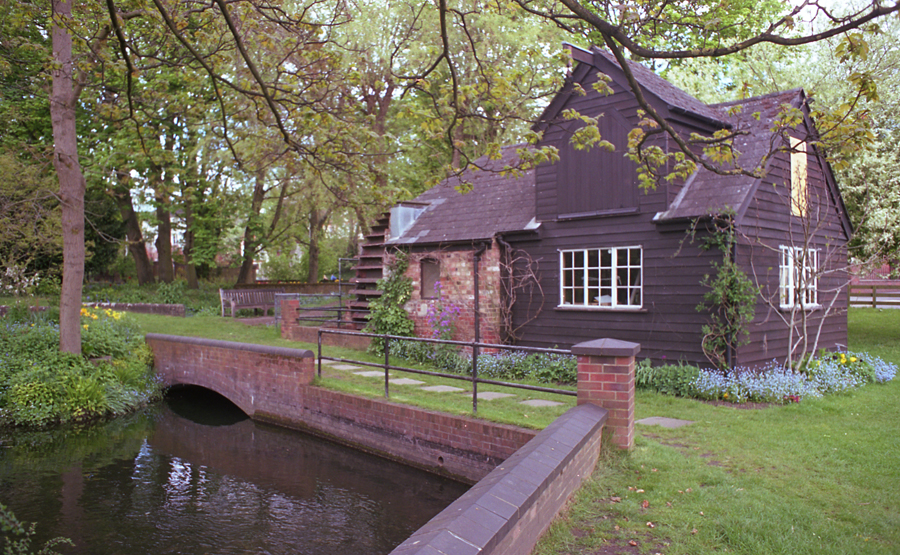
I discovered how to use these today. Wow, it certainly saves a lot of time. Every scan I make of Kodak Portra VC160 has a magenta cast like this example

I recorded an Action to correct the colours and add a little US mask and I can apply it to every picture with just one click. Not every picture comes out perfectly but it only needs a little tweaking, compared to 30 minutes+ of fiddling with each frame individually.
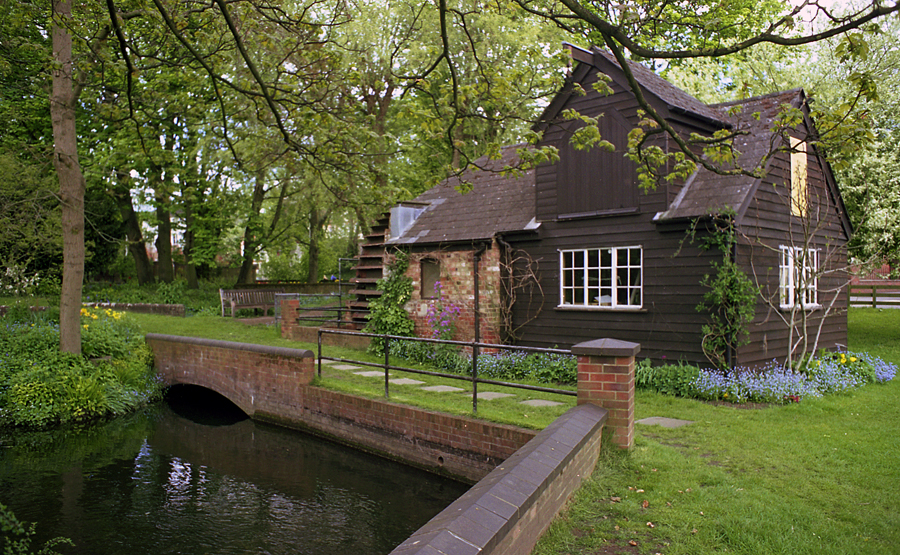
I'm going to write one for Portra NC160 now, which needs making a little warmer, and also Ektar to cut down the red saturation. Anybody else use Actions? Is it possible to share them?
_________________
Peter - Moderator |
|
| Haut de page |
|
 |
LucisPictor

Inscrit le: 26 Fév 2007
Messages: 17633
Localisation: Oberhessen, Germany / Maidstone ('95-'96)
Expire: 2013-12-03
|
Posté: Lun Déc 06, 2010 3:55 pm Sujet du message: |
|
Posté: Lun Déc 06, 2010 3:55 pm Sujet du message: |
|
|
LucisPictor wrote:
Yes, Peter, PS actions can be a great help.
_________________
Personal forum activity on pause every now and again (due to job obligations)!
Carsten, former Moderator 
Things ON SALE
Carsten = "KAPCTEH" = "Karusutenu" | T-shirt?.........................My photos from Emilia: http://www.schouler.net/emilia/emilia2011.html
My gear: http://retrocameracs.wordpress.com/ausrustung/
Old list: http://forum.mflenses.com/viewtopic.php?t=65 (Not up-to-date, sorry!) | http://www.lucispictor.de | http://www.alensaweek.wordpress.com |
http://www.retrocamera.de |
|
| Haut de page |
|
|
patrickh

Inscrit le: 23 Août 2007
Messages: 8551
Localisation: Oregon
Expire: 2011-11-18
|
Posté: Lun Déc 06, 2010 7:20 pm Sujet du message: |
|
Posté: Lun Déc 06, 2010 7:20 pm Sujet du message: |
|
|
patrickh wrote:
The Adobe website has a place where you can share them
patrickh
_________________
DSLR: Nikon D300 Nikon D200 Nex 5N
MF Zooms: Kiron 28-85/3.5, 28-105/3.2, 75-150/3.5, Nikkor 50-135/3.5 AIS // MF Primes: Nikkor 20/4 AI, 24/2 AI, 28/2 AI, 28/2.8 AIS, 28/3.5 AI, 35/1.4 AIS, 35/2 AIS, 35/2.8 PC, 45/2.8 P, 50/1.4 AIS, 50/1.8 AIS, 50/2 AI, 55/2.8 AIS micro, 55/3.5 AI micro, 85/2 AI, 100/2,8 E, 105/1,8 AIS, 105/2,5 AIS, 135/2 AIS, 135/2.8 AIS, 200/4 AI, 200/4 AIS micro, 300/4.5 AI, 300/4.5 AI ED, Arsat 50/1.4, Kiron 28/2, Vivitar 28/2.5, Panagor 135/2.8, Tamron 28/2.5, Tamron 90/2.5 macro, Vivitar 90/2.5 macro (Tokina) Voigtlander 90/3.5 Vivitar 105/2.5 macro (Kiron) Kaleinar 100/2.8 AI Tamron 135/2.5, Vivitar 135/2.8CF, 200/3.5, Tokina 400/5,6
M42: Vivitar 28/2.5, Tamron 28/2.5, Formula5 28/2.8, Mamiya 28/2.8, Pentacon 29/2.8, Flektogon 35/2.4, Flektogon 35/2.8, Takumar 35/3.5, Curtagon 35/4, Takumar 50/1.4, Volna-6 50/2.8 macro, Mamiya 50/1.4, CZJ Pancolar 50/1,8, Oreston 50/1.8, Takumar 50/2, Industar 50/3.5, Sears 55/1.4, Helios 58/2, Jupiter 85/2, Helios 85/1.5, Takumar 105/2.8, Steinheil macro 105/4.5, Tamron 135/2.5, Jupiter 135/4, CZ 135/4, Steinheil Culminar 135/4,5, Jupiter 135/3.5, Takumar 135/3.5, Tair 135/2.8, Pentacon 135/2.8, CZ 135/2.8, Taika 135/3.5, Takumar 150/4, Jupiter 200/4, Takumar 200/4
Exakta: Topcon 100/2.8(M42), 35/2.8, 58/1.8, 135/2.8, 135/2.8 (M42), Kyoei Acall 135/3.5
C/Y: Yashica 28/2.8, 50/1.7, 135/2.8, Zeiss Planar 50/1.4, Distagon 25/2.8
Hexanon: 28/3.5, 35/2.8, 40/1.8, 50/1.7, 52/1.8, 135/3.2, 135/3.5, 35-70/3.5, 200/3.5
P6 : Mir 38 65/3.5, Biometar 80/2.8, Kaleinar 150/2.8, Sonnar 180/2.8
Minolta SR: 28/2.8, 28/3.5, 35/2.8, 45/2, 50/2, 58/1.4, 50/1.7, 135/2.8, 200/3.5
RF: Industar 53/2.8, Jupiter 8 50/2
Enlarg: Rodagon 50/5,6, 80/5,6, 105/5.6, Vario 44-52/4, 150/5.6 180/5.6 El Nikkor 50/2,8,63/2.8,75/4, 80/5,6, 105/5.6, 135/5.6 Schneider 60/5.6, 80/5.6, 80/4S,100/5.6S,105/5.6,135/5.6, 135/5.6S, 150/5.6S, Leica 95/4 |
|
| Haut de page |
|
|
peterqd
Inscrit le: 28 Fév 2007
Messages: 7449
Localisation: near High Wycombe, UK
Expire: 2014-01-04
|
Posté: Lun Déc 06, 2010 9:08 pm Sujet du message: |
|
Posté: Lun Déc 06, 2010 9:08 pm Sujet du message: |
|
|
peterqd wrote:
Thankyou Patrick. I found that and bookmarked it. I really meant could we share actions between ourselves on the forum. Anyone is very welcome to try my feeble attempts so far 
_________________
Peter - Moderator |
|
| Haut de page |
|
|
Katastrofo
Inscrit le: 26 Fév 2007
Messages: 10405
Localisation: USA
Expire: 2013-11-19
|
Posté: Lun Déc 06, 2010 9:25 pm Sujet du message: |
|
Posté: Lun Déc 06, 2010 9:25 pm Sujet du message: |
|
|
Katastrofo wrote:
| LucisPictor a écrit: |
| Yes, Peter, PS actions can be a great help. |
Well said, Carsten!  And for every Photoshop action is a reaction,
nicely done, Peter! Is this cute little mill house, yours? |
|
| Haut de page |
|
|
peterqd
Inscrit le: 28 Fév 2007
Messages: 7449
Localisation: near High Wycombe, UK
Expire: 2014-01-04
|
Posté: Mar Déc 07, 2010 10:32 am Sujet du message: |
|
Posté: Mar Déc 07, 2010 10:32 am Sujet du message: |
|
|
peterqd wrote:
| Katastrofo a écrit: |
| nicely done, Peter! Is this cute little mill house, yours? |
It's on my estate somewhere Bill. I don't get a huge amount of time for milling flour myself these days so I leased it out.
http://www.pannmill.org.uk/
Now I've found out how to use Actions, I'm rescanning the whole roll of 160VC again and I'll be posting a few more pics in the Gallery later. If you remember, it was you who suggested I try it!
_________________
Peter - Moderator |
|
| Haut de page |
|
|
Katastrofo
Inscrit le: 26 Fév 2007
Messages: 10405
Localisation: USA
Expire: 2013-11-19
|
Posté: Mar Déc 07, 2010 5:59 pm Sujet du message: |
|
Posté: Mar Déc 07, 2010 5:59 pm Sujet du message: |
|
|
Katastrofo wrote:
Thanks, Peter, was going to say the above pic is not a 'run of the mill'
photo! Looking forward to more!  |
|
| Haut de page |
|
|
Orio

Inscrit le: 24 Fév 2007
Messages: 29545
Localisation: West Emilia
Expire: 2012-12-04
|
Posté: Mer Déc 08, 2010 12:00 am Sujet du message: |
|
Posté: Mer Déc 08, 2010 12:00 am Sujet du message: |
|
|
Orio wrote:
I shared already two sets of actions, one which I called "zeissifiers" and another one (well, it was a single action) to remove magenta cast from scans.
_________________
Orio, Administrator
T*
NE CEDE MALIS AUDENTIOR ITO
Ferrania film is reborn! http://www.filmferrania.it/
Support the Ornano film chemicals company and help them survive!
http://forum.mflenses.com/ornano-chemical-products-t55525.html |
|
| Haut de page |
|
|
peterqd
Inscrit le: 28 Fév 2007
Messages: 7449
Localisation: near High Wycombe, UK
Expire: 2014-01-04
|
Posté: Mer Déc 08, 2010 4:48 am Sujet du message: |
|
Posté: Mer Déc 08, 2010 4:48 am Sujet du message: |
|
|
peterqd wrote:
Thanks Orio. I missed this, it was among hundreds of posts I couldn't catch up with after I returned from holiday in June.
I tried it on the pic above and it appears to have virtually the same outcome as mine, although you understand what you're doing a lot better than I do! BTW, it works with CS3 as well as 4 & 5.
Now we have a new server, couldn't we make a library of these tiny files for members to download? They're so useful.
_________________
Peter - Moderator |
|
| Haut de page |
|
|
martinsmith99

Inscrit le: 31 Août 2008
Messages: 7029
Localisation: S Glos, UK
Expire: 2013-11-18
|
Posté: Mer Déc 08, 2010 7:03 am Sujet du message: |
|
Posté: Mer Déc 08, 2010 7:03 am Sujet du message: |
|
|
martinsmith99 wrote:
That's quite a difference Peter. I have yet to scan any Portra that's worthwhile, but I have a camera loaded with it at present so I'll see how it looks.
_________________
Casual attendance these days |
|
| Haut de page |
|
|
patrickh
Inscrit le: 23 Août 2007
Messages: 8551
Localisation: Oregon
Expire: 2011-11-18
|
Posté: Mer Déc 08, 2010 9:56 pm Sujet du message: |
|
Posté: Mer Déc 08, 2010 9:56 pm Sujet du message: |
|
|
patrickh wrote:
Peter
Have you checked out Vuescan? It's an amazing piece of software that is 100% supported by its author (Hamrick). Has a great deal of control over scanning, much more than the software that is boxed with the machine.
patrickh
_________________
DSLR: Nikon D300 Nikon D200 Nex 5N
MF Zooms: Kiron 28-85/3.5, 28-105/3.2, 75-150/3.5, Nikkor 50-135/3.5 AIS // MF Primes: Nikkor 20/4 AI, 24/2 AI, 28/2 AI, 28/2.8 AIS, 28/3.5 AI, 35/1.4 AIS, 35/2 AIS, 35/2.8 PC, 45/2.8 P, 50/1.4 AIS, 50/1.8 AIS, 50/2 AI, 55/2.8 AIS micro, 55/3.5 AI micro, 85/2 AI, 100/2,8 E, 105/1,8 AIS, 105/2,5 AIS, 135/2 AIS, 135/2.8 AIS, 200/4 AI, 200/4 AIS micro, 300/4.5 AI, 300/4.5 AI ED, Arsat 50/1.4, Kiron 28/2, Vivitar 28/2.5, Panagor 135/2.8, Tamron 28/2.5, Tamron 90/2.5 macro, Vivitar 90/2.5 macro (Tokina) Voigtlander 90/3.5 Vivitar 105/2.5 macro (Kiron) Kaleinar 100/2.8 AI Tamron 135/2.5, Vivitar 135/2.8CF, 200/3.5, Tokina 400/5,6
M42: Vivitar 28/2.5, Tamron 28/2.5, Formula5 28/2.8, Mamiya 28/2.8, Pentacon 29/2.8, Flektogon 35/2.4, Flektogon 35/2.8, Takumar 35/3.5, Curtagon 35/4, Takumar 50/1.4, Volna-6 50/2.8 macro, Mamiya 50/1.4, CZJ Pancolar 50/1,8, Oreston 50/1.8, Takumar 50/2, Industar 50/3.5, Sears 55/1.4, Helios 58/2, Jupiter 85/2, Helios 85/1.5, Takumar 105/2.8, Steinheil macro 105/4.5, Tamron 135/2.5, Jupiter 135/4, CZ 135/4, Steinheil Culminar 135/4,5, Jupiter 135/3.5, Takumar 135/3.5, Tair 135/2.8, Pentacon 135/2.8, CZ 135/2.8, Taika 135/3.5, Takumar 150/4, Jupiter 200/4, Takumar 200/4
Exakta: Topcon 100/2.8(M42), 35/2.8, 58/1.8, 135/2.8, 135/2.8 (M42), Kyoei Acall 135/3.5
C/Y: Yashica 28/2.8, 50/1.7, 135/2.8, Zeiss Planar 50/1.4, Distagon 25/2.8
Hexanon: 28/3.5, 35/2.8, 40/1.8, 50/1.7, 52/1.8, 135/3.2, 135/3.5, 35-70/3.5, 200/3.5
P6 : Mir 38 65/3.5, Biometar 80/2.8, Kaleinar 150/2.8, Sonnar 180/2.8
Minolta SR: 28/2.8, 28/3.5, 35/2.8, 45/2, 50/2, 58/1.4, 50/1.7, 135/2.8, 200/3.5
RF: Industar 53/2.8, Jupiter 8 50/2
Enlarg: Rodagon 50/5,6, 80/5,6, 105/5.6, Vario 44-52/4, 150/5.6 180/5.6 El Nikkor 50/2,8,63/2.8,75/4, 80/5,6, 105/5.6, 135/5.6 Schneider 60/5.6, 80/5.6, 80/4S,100/5.6S,105/5.6,135/5.6, 135/5.6S, 150/5.6S, Leica 95/4 |
|
| Haut de page |
|
|
peterqd
Inscrit le: 28 Fév 2007
Messages: 7449
Localisation: near High Wycombe, UK
Expire: 2014-01-04
|
Posté: Mer Déc 08, 2010 11:04 pm Sujet du message: |
|
Posté: Mer Déc 08, 2010 11:04 pm Sujet du message: |
|
|
peterqd wrote:
Patrick, I did try the demo of Vuescan a few years ago but that was when I had my very old Agfa scanner. I'll have another look at it now, I expect it has been upgraded a lot since then. Thanks for the tip.
_________________
Peter - Moderator |
|
| Haut de page |
|
|
patrickh
Inscrit le: 23 Août 2007
Messages: 8551
Localisation: Oregon
Expire: 2011-11-18
|
Posté: Jeu Déc 09, 2010 6:12 pm Sujet du message: |
|
Posté: Jeu Déc 09, 2010 6:12 pm Sujet du message: |
|
|
patrickh wrote:
I think you will be amazed at how far he has come since then
patrickh
_________________
DSLR: Nikon D300 Nikon D200 Nex 5N
MF Zooms: Kiron 28-85/3.5, 28-105/3.2, 75-150/3.5, Nikkor 50-135/3.5 AIS // MF Primes: Nikkor 20/4 AI, 24/2 AI, 28/2 AI, 28/2.8 AIS, 28/3.5 AI, 35/1.4 AIS, 35/2 AIS, 35/2.8 PC, 45/2.8 P, 50/1.4 AIS, 50/1.8 AIS, 50/2 AI, 55/2.8 AIS micro, 55/3.5 AI micro, 85/2 AI, 100/2,8 E, 105/1,8 AIS, 105/2,5 AIS, 135/2 AIS, 135/2.8 AIS, 200/4 AI, 200/4 AIS micro, 300/4.5 AI, 300/4.5 AI ED, Arsat 50/1.4, Kiron 28/2, Vivitar 28/2.5, Panagor 135/2.8, Tamron 28/2.5, Tamron 90/2.5 macro, Vivitar 90/2.5 macro (Tokina) Voigtlander 90/3.5 Vivitar 105/2.5 macro (Kiron) Kaleinar 100/2.8 AI Tamron 135/2.5, Vivitar 135/2.8CF, 200/3.5, Tokina 400/5,6
M42: Vivitar 28/2.5, Tamron 28/2.5, Formula5 28/2.8, Mamiya 28/2.8, Pentacon 29/2.8, Flektogon 35/2.4, Flektogon 35/2.8, Takumar 35/3.5, Curtagon 35/4, Takumar 50/1.4, Volna-6 50/2.8 macro, Mamiya 50/1.4, CZJ Pancolar 50/1,8, Oreston 50/1.8, Takumar 50/2, Industar 50/3.5, Sears 55/1.4, Helios 58/2, Jupiter 85/2, Helios 85/1.5, Takumar 105/2.8, Steinheil macro 105/4.5, Tamron 135/2.5, Jupiter 135/4, CZ 135/4, Steinheil Culminar 135/4,5, Jupiter 135/3.5, Takumar 135/3.5, Tair 135/2.8, Pentacon 135/2.8, CZ 135/2.8, Taika 135/3.5, Takumar 150/4, Jupiter 200/4, Takumar 200/4
Exakta: Topcon 100/2.8(M42), 35/2.8, 58/1.8, 135/2.8, 135/2.8 (M42), Kyoei Acall 135/3.5
C/Y: Yashica 28/2.8, 50/1.7, 135/2.8, Zeiss Planar 50/1.4, Distagon 25/2.8
Hexanon: 28/3.5, 35/2.8, 40/1.8, 50/1.7, 52/1.8, 135/3.2, 135/3.5, 35-70/3.5, 200/3.5
P6 : Mir 38 65/3.5, Biometar 80/2.8, Kaleinar 150/2.8, Sonnar 180/2.8
Minolta SR: 28/2.8, 28/3.5, 35/2.8, 45/2, 50/2, 58/1.4, 50/1.7, 135/2.8, 200/3.5
RF: Industar 53/2.8, Jupiter 8 50/2
Enlarg: Rodagon 50/5,6, 80/5,6, 105/5.6, Vario 44-52/4, 150/5.6 180/5.6 El Nikkor 50/2,8,63/2.8,75/4, 80/5,6, 105/5.6, 135/5.6 Schneider 60/5.6, 80/5.6, 80/4S,100/5.6S,105/5.6,135/5.6, 135/5.6S, 150/5.6S, Leica 95/4 |
|
| Haut de page |
|
|
lulalake


Inscrit le: 22 Avr 2007
Messages: 1191
Localisation: Near Austin Texas
Expire: 2011-11-18
|
Posté: Ven Déc 10, 2010 8:56 pm Sujet du message: |
|
Posté: Ven Déc 10, 2010 8:56 pm Sujet du message: |
|
|
lulalake wrote:
| patrickh a écrit: |
Peter
Have you checked out Vuescan? It's an amazing piece of software that is 100% supported by its author (Hamrick). Has a great deal of control over scanning, much more than the software that is boxed with the machine.
patrickh |
I like Viewscan for MF film very much for as difficult as it can be to use, the results are really nice.
Jules |
|
| Haut de page |
|
|
peterqd
Inscrit le: 28 Fév 2007
Messages: 7449
Localisation: near High Wycombe, UK
Expire: 2014-01-04
|
Posté: Ven Déc 10, 2010 11:05 pm Sujet du message: |
|
Posté: Ven Déc 10, 2010 11:05 pm Sujet du message: |
|
|
peterqd wrote:
I've downloaded it and running it demo mode. Is there way of correcting the base colour of the film? I'm getting a very strong cyan cast with Portra 160VC (in positive) and I can't see what I need to do. First impressions other than that are quite good.
_________________
Peter - Moderator |
|
| Haut de page |
|
|
bogolisk

Inscrit le: 20 Déc 2009
Messages: 448
Expire: 2011-11-18
|
Posté: Sam Déc 11, 2010 12:52 am Sujet du message: |
|
Posté: Sam Déc 11, 2010 12:52 am Sujet du message: |
|
|
bogolisk wrote:
I've never been able to do any thing I like with vuescan... It's just me! However, I got better results with ColorPerfect.
_________________
When I try to be a photographer I manage to add an f to art. |
|
| Haut de page |
|
|
WolverineX

Inscrit le: 19 Avr 2009
Messages: 1693
Localisation: Zagreb , Croatia , Europe
|
Posté: Lun Déc 20, 2010 11:18 pm Sujet du message: |
|
Posté: Lun Déc 20, 2010 11:18 pm Sujet du message: |
|
|
WolverineX wrote:
| patrickh a écrit: |
The Adobe website has a place where you can share them
patrickh |
you can find many photoshop actions here:
http://browse.deviantart.com/resources/applications/psactions/
_________________
my tools:Oly E-M5 + 45mm/1.8 + Oly E-520 + 12-60 + 14-42 + 70-300 + Sigma 105mm + FL-50R + EC20 + SRF-11 ring flash
http://forum.mflenses.com/wolverinex-testing-my-lenses-series-link-list-t39524.html |
|
| Haut de page |
|
|
|
|
 Français
 Español
 中文
 Magyar
 Русский
 Deutsch
 日本語