| Voir le sujet précédent :: Voir le sujet suivant |
| Auteur |
Message |
romans001 

Inscrit le: 06 Août 2013
Messages: 41
Localisation: Slovakia
|
 Posté: Jeu Août 08, 2013 6:31 am Sujet du message: HOW? simulate white balance of jpeg in camera raw software? |
|
Posté: Jeu Août 08, 2013 6:31 am Sujet du message: HOW? simulate white balance of jpeg in camera raw software? |
|
|
romans001 wrote:
i hope you are all getting well,
i just cant find answer to one "simple" question. You probably know that, or can point me to right direction 
How can i simulate white balance of jpeg in camera raw software?
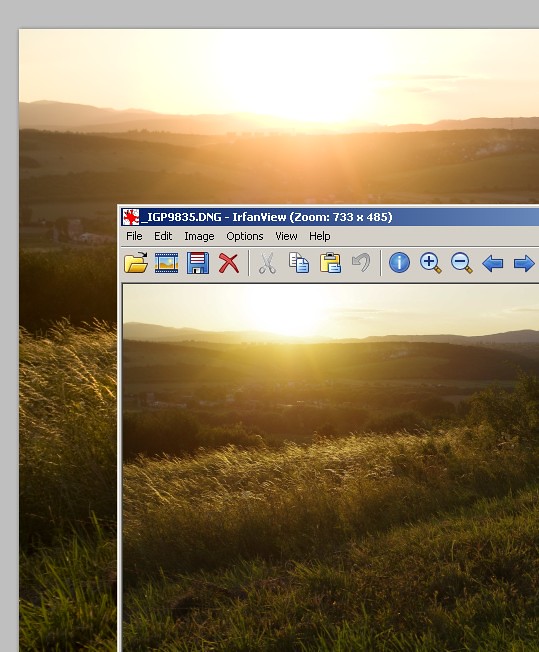
when i opened RAW photo in camera raw, white balance "as shot" doesnt look so great as for raw preview in image viewer like irfanview
much appreciate
here is example, see colors around setting sun. Lower image is raw preview with image viewer like irfanview. Upper one is crop from camera raw
 |
|
| Haut de page |
|
 |
std


Inscrit le: 09 Fév 2010
Messages: 1826
Localisation: Bulgaria
|
Posté: Jeu Août 08, 2013 7:42 am Sujet du message: |
|
Posté: Jeu Août 08, 2013 7:42 am Sujet du message: |
|
|
std wrote:
It's not the white balance which is different - it's the colors.
I would not trust neither Irfanview neither Adobe to get the same processing as in camera JPEG.
Every raw converter makes the conversion different.
Your best try will be to use the manufacturer supplied raw converter: DPP for Canon, Olympus Viewer for Olympus and Image Data converter for Sony, etc. Those will give you the same processing as incamera jpegs.
Anyways if you are looking for consistent results with Adobe you are looking at purchasing a color target like X-Rite ColorChecker Passport, which you can use to create a profile for every set of pictures you are taking. Those profiles will be very different than the supplied Adobe profiles and will get the correct colors and white balance every time.
_________________
Stefan
My lens list:
SLR MD: Rokkor 1,7/50 Exakta: Kilfitt-Makro-Kilar E 3.5/4cm; CZJ 2/50 Pancolar;M42: CZJ 2.8/50 Tessar; Mir-1B 2.8/37; Jupiter-9 2/85 T-mount: Tamron 5.9/200; Tamron 6.9/300; Tamron 7.5/400 C-mount: Cosmicar 1.8/50 Y/S: Sun 3.5/38-90, Sun 4/70-210 RF Contax RF: Jupiter-8 2/50; Contax G:CZ 2,8/21 Biogon T; CZ 2,8/28 Biogon T; CZ 2/35 Planar T; CZ 2/45 Planar T; CZ 2,8/90 Sonnar T |
|
| Haut de page |
|
|
romans001
Inscrit le: 06 Août 2013
Messages: 41
Localisation: Slovakia
|
Posté: Jeu Août 08, 2013 7:53 am Sujet du message: |
|
Posté: Jeu Août 08, 2013 7:53 am Sujet du message: |
|
|
romans001 wrote:
thank you, will dig more into this topic |
|
| Haut de page |
|
|
LucisPictor

Inscrit le: 26 Fév 2007
Messages: 17633
Localisation: Oberhessen, Germany / Maidstone ('95-'96)
Expire: 2013-12-03
|
Posté: Jeu Août 08, 2013 9:52 am Sujet du message: |
|
Posté: Jeu Août 08, 2013 9:52 am Sujet du message: |
|
|
LucisPictor wrote:
You can either process the colours according to preices, objective colour temperature or according to what you saw and remember.
I always opt for the second way. 
(I don't shoot product photography, though.)
_________________
Personal forum activity on pause every now and again (due to job obligations)!
Carsten, former Moderator 
Things ON SALE
Carsten = "KAPCTEH" = "Karusutenu" | T-shirt?.........................My photos from Emilia: http://www.schouler.net/emilia/emilia2011.html
My gear: http://retrocameracs.wordpress.com/ausrustung/
Old list: http://forum.mflenses.com/viewtopic.php?t=65 (Not up-to-date, sorry!) | http://www.lucispictor.de | http://www.alensaweek.wordpress.com |
http://www.retrocamera.de |
|
| Haut de page |
|
|
romans001
Inscrit le: 06 Août 2013
Messages: 41
Localisation: Slovakia
|
Posté: Jeu Août 08, 2013 5:22 pm Sujet du message: |
|
Posté: Jeu Août 08, 2013 5:22 pm Sujet du message: |
|
|
romans001 wrote:
yes, i also trying to match colors according to my subject needs but sometimes i like colors of raw preview so much that i am trying to achieve this result in camera raw adjustments, but its not so easy |
|
| Haut de page |
|
|
Attila

Inscrit le: 24 Fév 2007
Messages: 58002
Expire: 2025-11-18
|
Posté: Jeu Août 08, 2013 6:25 pm Sujet du message: |
|
Posté: Jeu Août 08, 2013 6:25 pm Sujet du message: |
|
|
Attila wrote:
One simple tip most cameras has raw+jpg setting , use it I use Acdsee Pro mainly, affordable and do most things what need to me even in batch process. |
|
| Haut de page |
|
|
std
Inscrit le: 09 Fév 2010
Messages: 1826
Localisation: Bulgaria
|
Posté: Jeu Août 08, 2013 7:06 pm Sujet du message: |
|
Posté: Jeu Août 08, 2013 7:06 pm Sujet du message: |
|
|
std wrote:
Yes sometimes i also like the colors of the Jpeg output from my Olympus pen and even trying hard to replicate it in Lightroom i cannot do it. So instead that i develop the raw files with Olympus viewer and save them as a Tiff which then i import in Lightroom for further processing.
_________________
Stefan
My lens list:
SLR MD: Rokkor 1,7/50 Exakta: Kilfitt-Makro-Kilar E 3.5/4cm; CZJ 2/50 Pancolar;M42: CZJ 2.8/50 Tessar; Mir-1B 2.8/37; Jupiter-9 2/85 T-mount: Tamron 5.9/200; Tamron 6.9/300; Tamron 7.5/400 C-mount: Cosmicar 1.8/50 Y/S: Sun 3.5/38-90, Sun 4/70-210 RF Contax RF: Jupiter-8 2/50; Contax G:CZ 2,8/21 Biogon T; CZ 2,8/28 Biogon T; CZ 2/35 Planar T; CZ 2/45 Planar T; CZ 2,8/90 Sonnar T |
|
| Haut de page |
|
|
LucisPictor
Inscrit le: 26 Fév 2007
Messages: 17633
Localisation: Oberhessen, Germany / Maidstone ('95-'96)
Expire: 2013-12-03
|
Posté: Jeu Août 08, 2013 7:19 pm Sujet du message: |
|
Posté: Jeu Août 08, 2013 7:19 pm Sujet du message: |
|
|
LucisPictor wrote:
| romans001 a écrit: |
| yes, i also trying to match colors according to my subject needs but sometimes i like colors of raw preview so much that i am trying to achieve this result in camera raw adjustments, but its not so easy |
Which camera do you use? The newer Canon DSLRs have all got the "picture styles" and with those you can achieve similar results also later in post-production.
_________________
Personal forum activity on pause every now and again (due to job obligations)!
Carsten, former Moderator
Things ON SALE
Carsten = "KAPCTEH" = "Karusutenu" | T-shirt?.........................My photos from Emilia: http://www.schouler.net/emilia/emilia2011.html
My gear: http://retrocameracs.wordpress.com/ausrustung/
Old list: http://forum.mflenses.com/viewtopic.php?t=65 (Not up-to-date, sorry!) | http://www.lucispictor.de | http://www.alensaweek.wordpress.com |
http://www.retrocamera.de |
|
| Haut de page |
|
|
visualopsins

Inscrit le: 05 Mar 2009
Messages: 11698
Localisation: California
Expire: 2027-07-11
|
Posté: Jeu Août 08, 2013 7:32 pm Sujet du message: |
|
Posté: Jeu Août 08, 2013 7:32 pm Sujet du message: |
|
|
visualopsins wrote:
Irfanview shows the jpeg embedded inside raw DNG file. That jpeg is DNG as developed inside camera -- that jpeg should view identical to raw DNG viewed in raw editor with "As Shot" setting.
May be DNG editor has used a different color space?
Irfanview can extract the jpeg image in the raw DNG file -- choose "Save As"
_________________
☮☮☮☮☮☮☮☮☮☮☮☮☮☮☮☮☮☮☮☮☮☮☮☮☮☮☮☮☮☮☮☮ like attracts like! ☮☮☮☮☮☮☮☮☮☮☮☮☮☮☮☮☮☮☮☮☮☮☮☮☮☮☮☮☮☮☮☮
Cameras: Sony ILCE-7RM2, Spotmatics II, F, and ESII, Nikon P4
Lenses:
M42 Asahi Optical Co., Takumar 1:4 f=35mm, 1:2 f=58mm (Sonnar), 1:2.4 f=58mm (Heliar), 1:2.2 f=55mm (Gaussian), 1:2.8 f=105mm (Model I), 1:2.8/105 (Model II), 1:5.6/200, Tele-Takumar 1:5.6/200, 1:6.3/300, Macro-Takumar 1:4/50, Auto-Takumar 1:2.3 f=35, 1:1.8 f=55mm, 1:2.2 f=55mm, Super-TAKUMAR 1:3.5/28 (fat), 1:2/35 (Fat), 1:1.4/50 (8-element), Super-Multi-Coated Fisheye-TAKUMAR 1:4/17, Super-Multi-Coated TAKUMAR 1:4.5/20, 1:3.5/24, 1:3.5/28, 1:2/35, 1:3.5/35, 1:1.8/85, 1:1.9/85 1:2.8/105, 1:3.5/135, 1:2.5/135 (II), 1:4/150, 1:4/200, 1:4/300, 1:4.5/500, Super-Multi-Coated Macro-TAKUMAR 1:4/50, 1:4/100, Super-Multi-Coated Bellows-TAKUMAR 1:4/100, SMC TAKUMAR 1:1.4/50, 1:1.8/55
M42 Carl Zeiss Jena Flektogon 2.4/35
Contax Carl Zeiss Vario-Sonnar T* 28-70mm F3.5-4.5
Pentax K-mount SMC PENTAX-A ZOOM 1:3.5 35~105mm, SMC PENTAX ZOOM 1:4 45~125mm
Nikon Micro-NIKKOR-P-C Auto 1:3.5 f=55mm, NIKKOR-P Auto 105mm f/2.5 Pre-AI (Sonnar), Micro-NIKKOR 105mm 1:4 AI, NIKKOR AI-S 35-135mm f/3,5-4,5
Solinon 1:5.6/18 ASPH.
Tamron SP 17mm f/3.5 (51B), Tamron SP 17mm f/3.5 (151B), SP 500mm f/8 (55BB), SP 70-210mm f/3.5 (19AH)
Vivitar 100mm 1:2.8 MC 1:1 Macro Telephoto (Kiron)
|
|
| Haut de page |
|
|
|
|
|
Vous ne pouvez pas publier de nouveaux sujets dans ce forum
Vous ne pouvez pas répondre aux sujets de ce forum
Vous ne pouvez pas modifier vos messages dans ce forum
Vous ne pouvez pas supprimer vos messages dans ce forum
Vous ne pouvez pas voter dans les sondages de ce forum
|
 Français
 Español
 中文
 Magyar
 Русский
 Deutsch
 日本語


