| Voir le sujet précédent :: Voir le sujet suivant |
| Auteur |
Message |
peterqd 

Inscrit le: 28 Fév 2007
Messages: 7449
Localisation: near High Wycombe, UK
Expire: 2014-01-04
|
 Posté: Lun Mar 22, 2010 3:56 pm Sujet du message: Removing flare |
|
Posté: Lun Mar 22, 2010 3:56 pm Sujet du message: Removing flare |
|
|
peterqd wrote:
I need some help! I use PS3 and Canon's DPP Viewer module for CR2 files.
1 How do you remove flare? Is it the levels sliders?
2 How do you save and implement a standard procedure (like a Word macro)?
I keep reading it's easy to remove flare but I must be doing something wrong I think. My Mir-24M is quite flary sunwards and I often have to do this job. It would save me hours if I knew the answer to No 2!! 
See what you can do with this file and tell me how you did it please:

_________________
Peter - Moderator |
|
| Haut de page |
|
 |
Rolf

Inscrit le: 02 Mai 2009
Messages: 4170
Localisation: NRW/Germany
Expire: 2015-12-26
|
Posté: Lun Mar 22, 2010 4:27 pm Sujet du message: |
|
Posté: Lun Mar 22, 2010 4:27 pm Sujet du message: |
|
|
Rolf wrote:
Hi,
hopefully you allow me to show my sample of your image

If you have only a little amount of flare like in your sample I use the copy stamp (I´m not sure that this is the right word in English because I own the German version). I have done it here.
Then exposure correction, some tone gradients, maybe a little bit more colour, sharpening ( i use absolute sharpening).
Then resizing (not necessary here) with additional sharpening, saving and at least a little bit additional sharpening with DPP at the end of process.

_________________
Rolf |
|
| Haut de page |
|
|
poilu
Inscrit le: 26 Août 2007
Messages: 10476
Localisation: Greece
Expire: 2019-08-29
|
Posté: Lun Mar 22, 2010 4:53 pm Sujet du message: |
|
Posté: Lun Mar 22, 2010 4:53 pm Sujet du message: |
|
|
poilu wrote:
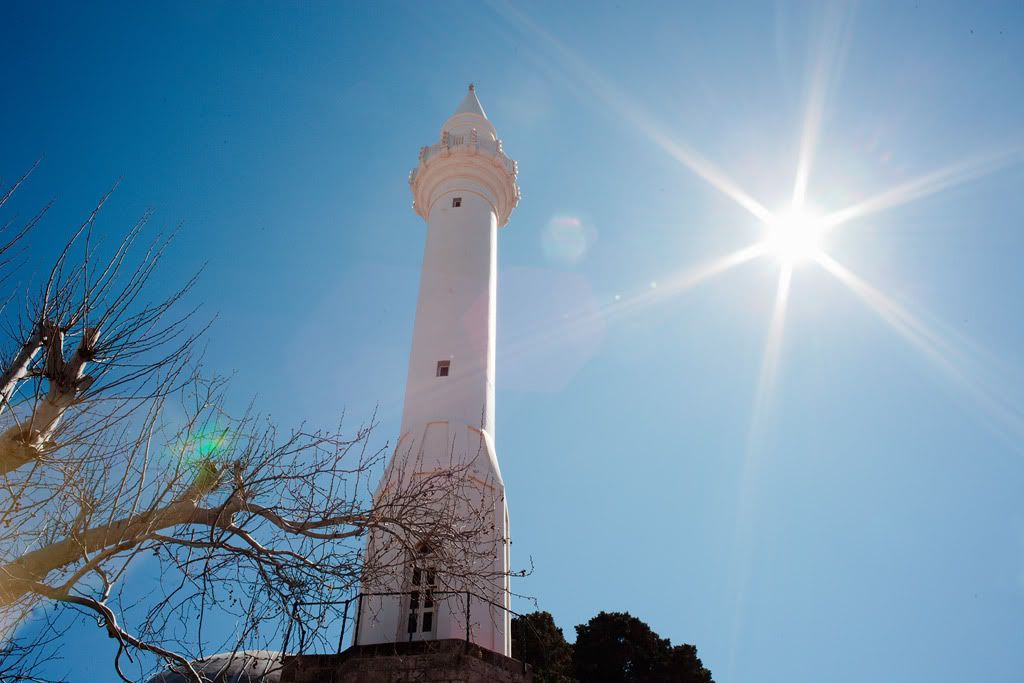
flare is difficult to correct, I always forget hood and I got flared today
_________________
T* |
|
| Haut de page |
|
|
Rolf
Inscrit le: 02 Mai 2009
Messages: 4170
Localisation: NRW/Germany
Expire: 2015-12-26
|
Posté: Lun Mar 22, 2010 5:12 pm Sujet du message: |
|
Posté: Lun Mar 22, 2010 5:12 pm Sujet du message: |
|
|
Rolf wrote:
Yes Poilu, you have right. Best is to prevent flare.
With your sample here it is more hopeless to remove it with PP
_________________
Rolf |
|
| Haut de page |
|
|
peterqd
Inscrit le: 28 Fév 2007
Messages: 7449
Localisation: near High Wycombe, UK
Expire: 2014-01-04
|
Posté: Lun Mar 22, 2010 5:54 pm Sujet du message: |
|
Posté: Lun Mar 22, 2010 5:54 pm Sujet du message: |
|
|
peterqd wrote:
Thanks Rolf, that's better but it seems quite a long-winded process. Can it be automated?
Poilu, I wish I could find a 58mm hood that suits the Mir. I bought a nice metal one from Germany recently on Orio's tip - it's supposed to be suitable for 35mm but it vignettes. 
_________________
Peter - Moderator |
|
| Haut de page |
|
|
Schnauzer


Inscrit le: 09 Avr 2008
Messages: 2155
Localisation: Maine, USA
Expire: 2012-03-08
|
Posté: Lun Mar 22, 2010 6:57 pm Sujet du message: |
|
Posté: Lun Mar 22, 2010 6:57 pm Sujet du message: |
|
|
Schnauzer wrote:
If you ask RJ he probable has a hood to fit. If a regular vignettes you probable want a wide angle hood. He has both types. They are metal and screw into the filter threads.
I have seven coming from him now. He has been good to do business with.
Send a message to him and ask.
http://stores.ebay.com/RJ-camera-accessory-store?_rdc=1
_________________
Ron |
|
| Haut de page |
|
|
peterqd
Inscrit le: 28 Fév 2007
Messages: 7449
Localisation: near High Wycombe, UK
Expire: 2014-01-04
|
Posté: Jeu Mar 25, 2010 10:43 am Sujet du message: |
|
Posté: Jeu Mar 25, 2010 10:43 am Sujet du message: |
|
|
peterqd wrote:
Nobody else knows how to remove flare or make a "recipe" in PS?
_________________
Peter - Moderator |
|
| Haut de page |
|
|
LucisPictor

Inscrit le: 26 Fév 2007
Messages: 17633
Localisation: Oberhessen, Germany / Maidstone ('95-'96)
Expire: 2013-12-03
|
Posté: Jeu Mar 25, 2010 3:36 pm Sujet du message: |
|
Posté: Jeu Mar 25, 2010 3:36 pm Sujet du message: |
|
|
LucisPictor wrote:
Peter, wait for CS5. There is feature included which is called content-aware fill.
It seems to work like a charm:
http://www.youtube.com/watch?v=NH0aEp1oDOI
_________________
Personal forum activity on pause every now and again (due to job obligations)!
Carsten, former Moderator 
Things ON SALE
Carsten = "KAPCTEH" = "Karusutenu" | T-shirt?.........................My photos from Emilia: http://www.schouler.net/emilia/emilia2011.html
My gear: http://retrocameracs.wordpress.com/ausrustung/
Old list: http://forum.mflenses.com/viewtopic.php?t=65 (Not up-to-date, sorry!) | http://www.lucispictor.de | http://www.alensaweek.wordpress.com |
http://www.retrocamera.de |
|
| Haut de page |
|
|
supahmario

Inscrit le: 18 Mar 2009
Messages: 615
Localisation: Berlin, Germany
|
Posté: Ven Mar 26, 2010 9:03 am Sujet du message: |
|
Posté: Ven Mar 26, 2010 9:03 am Sujet du message: |
|
|
supahmario wrote:
pretty crazy what it does in the last pano 
_________________
EOS 5D, EOS 30
Leica-R: Summicron 2/50
QBM: Distagon 2.8/35
PK: Tokina 3.5/17, Porst 1.2/55
M42: S-M-C Takumar 3.5/24, S-M-C Takumar 1.8/55, CZJ MC Sonnar 3.5/135, Jupiter 21M 4/200
|
|
| Haut de page |
|
|
peterqd
Inscrit le: 28 Fév 2007
Messages: 7449
Localisation: near High Wycombe, UK
Expire: 2014-01-04
|
Posté: Ven Mar 26, 2010 9:53 am Sujet du message: |
|
Posté: Ven Mar 26, 2010 9:53 am Sujet du message: |
|
|
peterqd wrote:
Thanks Carsten. What I want to do is get rid of the misty effect. I'm not too bothered about the green sun reflection. I called the misty effect "flare", maybe I should have used a different word, "glare" perhaps?
_________________
Peter - Moderator |
|
| Haut de page |
|
|
Himself
Inscrit le: 01 Mar 2007
Messages: 3315
Localisation: Montreal
Expire: 2013-05-30
|
Posté: Ven Mar 26, 2010 4:13 pm Sujet du message: |
|
Posté: Ven Mar 26, 2010 4:13 pm Sujet du message: |
|
|
Himself wrote:
I'd say that it can't be automated.
You can not set up an action or a brush to do that.
Just by hand, pixel by pixel if necessary.
You can use the healing tool also. |
|
| Haut de page |
|
|
LucisPictor
Inscrit le: 26 Fév 2007
Messages: 17633
Localisation: Oberhessen, Germany / Maidstone ('95-'96)
Expire: 2013-12-03
|
Posté: Ven Mar 26, 2010 5:19 pm Sujet du message: |
|
Posté: Ven Mar 26, 2010 5:19 pm Sujet du message: |
|
|
LucisPictor wrote:
| peterqd a écrit: |
| Thanks Carsten. What I want to do is get rid of the misty effect. I'm not too bothered about the green sun reflection. I called the misty effect "flare", maybe I should have used a different word, "glare" perhaps? |
Ah, OK. I think it's also called "flare", Peter. So, don't worry.
You should be able to cope with that using the level and curve functions.
_________________
Personal forum activity on pause every now and again (due to job obligations)!
Carsten, former Moderator
Things ON SALE
Carsten = "KAPCTEH" = "Karusutenu" | T-shirt?.........................My photos from Emilia: http://www.schouler.net/emilia/emilia2011.html
My gear: http://retrocameracs.wordpress.com/ausrustung/
Old list: http://forum.mflenses.com/viewtopic.php?t=65 (Not up-to-date, sorry!) | http://www.lucispictor.de | http://www.alensaweek.wordpress.com |
http://www.retrocamera.de |
|
| Haut de page |
|
|
martinsmith99

Inscrit le: 31 Août 2008
Messages: 7029
Localisation: S Glos, UK
Expire: 2013-11-18
|
Posté: Ven Mar 26, 2010 5:42 pm Sujet du message: |
|
Posté: Ven Mar 26, 2010 5:42 pm Sujet du message: |
|
|
martinsmith99 wrote:
That glare/flare would be difficult to remove with automation. The amount of curves & sharpening would vary too much.
_________________
Casual attendance these days |
|
| Haut de page |
|
|
peterqd
Inscrit le: 28 Fév 2007
Messages: 7449
Localisation: near High Wycombe, UK
Expire: 2014-01-04
|
Posté: Ven Mar 26, 2010 6:34 pm Sujet du message: |
|
Posté: Ven Mar 26, 2010 6:34 pm Sujet du message: |
|
|
peterqd wrote:
Thanks everyone. I simply use the middle slider in levels at the moment, this is the result:

I didn't actually want to use automation for this, that was a separate question! I can use the Save & Load buttons in Levels to apply a "recipe". What I want to know is how to record and apply a series of actions on a batch of files, for instance resizing, using a keyboard shortcut or similar. I know how to do it in DPP but not in PS. I'm sure it's possible, but I can't find it in Help.
_________________
Peter - Moderator |
|
| Haut de page |
|
|
|
|
|
Vous ne pouvez pas publier de nouveaux sujets dans ce forum
Vous ne pouvez pas répondre aux sujets de ce forum
Vous ne pouvez pas modifier vos messages dans ce forum
Vous ne pouvez pas supprimer vos messages dans ce forum
Vous ne pouvez pas voter dans les sondages de ce forum
|
 Français
 Español
 中文
 Magyar
 Русский
 Deutsch
 日本語


